Showing posts with label operating system. Show all posts

Wednesday, February 24, 2010

Windows 7 RC's bi-hourly shutdowns begin on Monday

J
ust a quick heads up for those who signed up to run the Release Candidate (build 7100) version of Windows 7 and never upgraded to the final code: get going with that or prepared to be annoyed. Starting this Monday, March 1st, besides showing an expiration notification on the taskbar, your system will start to shut down every two hours and any unsaved work will be lost in the process.
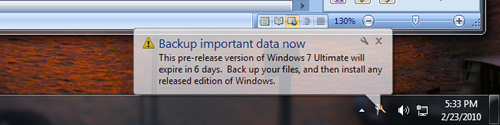


Those brave souls who ignore the "reminders" and work their way around the shutdowns will face one more phase in the expiration process. On June 1, if you are still on the Windows 7 RC, your license will expire and the non-genuine experience will be triggered. This means Windows will boot to a black desktop and users will still have to deal with the constant notifications and bi-hourly shutdowns.

As annoying as all this may sound, especially for those who have been running the test release as their main installation, we can't say Microsoft wasn't clear about the whole expiration process from the get go.

That said, if you need some more time to back up your stuff there is a little-known (and perfectly legal) way to extend your RC license as many as 90 more days -- just open a command prompt window with administrator privileges, enter "slmgr -rearm" (minus the quotes) and reboot. The 'trick' can be used up to three times and each will give you 30 days to go grab a legal copy of Windows 7 and upgrade.

Read more...
Sunday, February 21, 2010

Weekend Open Forum: What's your preferred mobile phone platform and handset?

I
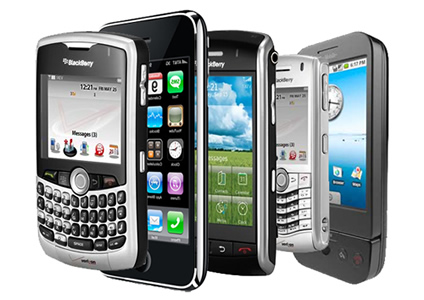
n the past three years we've seen a number of new smartphone operating systems burst onto the scene. From Apple's wildly successful iPhone OS, to Google's increasingly popular Android and Palm's praised yet still floundering WebOS -- to name a few. Microsoft is no stranger to the market either, but just recently the company took a radical departure from its previous business-centered strategy and unveiled what looks to be a potentially solid contender in the consumer space: the Windows Phone 7 Series.

All of them are characterized for powering a new generation of touch-driven, fast and feature-rich devices that evermore seem to be turning into pocket-sized computers. The fact that three of the most significant companies in desktop computing -- Apple, Google and Microsoft -- now stand to occupy the same positions in mobile is a clear indication of where the industry is going.


Others like Nokia and RIM have arguably been a bit slower to adapt to the latest trends -- or have preferred to focus their efforts on a particular niche -- but still command an undeniable large portion of the cell phone market. Like them there are also a number of big-name industry players peddling their own platforms and hardware, including Samsung, Sony Ericsson, Motorola, Toshiba, HTC and LG Electronics.

In this edition of our Weekend Open Forum we want to know what kind of device you are currently using. Have you jumped into the smartphone and mobile app craze? Are you more of the business user type? Or perhaps you are comfortable with anything that can make a simple phone call? Feel free to share what you love or hate about your current hardware and mobile platform, as well as any plans for your next purchase.

Read more...

Wednesday, August 26, 2009

Anti-malware feature quietly slipped into Snow Leopard?

D

ue Friday the 28, Apple's next version of OS X, 10.6 Snow Leopard, may contain an antimalware function of sorts. A report from Mac security firm Intego came yesterday that early testers of the new OS have unearthed some form of bundled-in malware prevention tool.
Neither the firm or users are entirely sure how the function works, but a screenshot shows the feature working with a file downloaded via Safari. The antimalware tool detected a version of the RSPlug Trojan horse in a downloaded disk image.


This is an interesting discovery, considering Apple's long-held stance that PCs are insecure and virus-riddled, whereas Macs "just work." This message is endlessly propagated in Cupertino's "Get a Mac" campaign, where they portray Macs as being trouble-free in the malware department.

While that may be largely true, most would argue that OS X is no more secure than any other operating system, it's just less circulated. With Microsoft Windows installed on 90-plus-percent of computers, it's the obvious target of malware authors.

Read more...

Wednesday, August 19, 2009

Windows 7 Product Editions Compared

B
efore Windows Vista, Microsoft made the sale of its Windows operating system view easy and concise. Windows XP only had Home and Professional editions and the decision was easy because home users used home edition and business users used professional edition. Windows Vista was introduced with six different product editions and made things a little complicated for end users. Some users were unable to differentiate between Vista Home Basic and Home Premium, but the main difference was simply a matter of performance and "eye-candy" between the two versions.


Windows 7 continues the same six product editions but with slightly different names and the ways that they are differentiated. In this article, we will try to break it all down and make it easy to understand because it really isn't that complicated with a little explanation. The chart below is a quick summarization of the various product editions with details and a comparison to a Vista product edition.

Windows 7 Edition Comparable Vista Edition Full / Upgrade Price 32-bit / 64-bit
Starter Home Basic No retail avail. Yes / No
Home Basic Starter No retail avail. Yes / No
Home Premium Home Premium $200 / $120 Yes / Yes
Professional Business $300 / $200 Yes / Yes
Ultimate Ultimate $320 / $220 Yes / Yes
Enterprise Enterprise No retail avail. Yes / Yes

Windows 7 Starter:


Windows 7 Starter:

The lowest-end product edition of Windows 7 is the Starter edition, which will be preinstalled on low-end computers and computers without enough processing power for other editions, such as a netbook. Unlike Windows 7 Home Basic edition, Starter edition will be sold in the United States and other mainstream markets. The system requirements of Windows 7 Starter are the following: a low-end CPU processor, 1GB of RAM, 256GB (max) hard drive, and a 10.2" (or smaller) display.

The interface of Windows 7 Starter is cut down and only includes the Windows Basic interface and not the Windows Aero interface, which is the "glassy" transparent windows. You also do not get Aero Peek and Shake. Windows Media Center is not included, but Windows Media Player is. Users cannot change the desktop wallpaper in this edition, which is a bizarre restriction.

Windows 7 Home Basic:

This Home Basic edition, unlike Starter, will not be sold in mainstream markets, including the United States. It will be installed with low-end PCs in emerging countries, such as India. The system requirements are similar to the Starter edition's requirements above.

Windows 7 Home Premium:

Home Premium will be the edition that an overwhelming majority of computer users in the United States will choose, mostly because it will come pre-installed on new computers after the October 22nd release of Windows 7. This edition comes with all of the desktop enhancements that Windows 7 has to offer, including Windows Aero, Flip 3D, Live Thumbnails, and the ability to customize all aspects of the user interface.

Windows 7 Home Premium comes with all of the multimedia features, such as Windows Media Center, DVD Maker, Windows Media Player, and all of the games that Windows 7 has to offer. Windows Mobility Center is also included, which provides advanced features for laptop and portable devices as well as touch input and multi-touch functionality.

If you are an average to above-average computer user who will use this product in a home or home business setting, this is most likely the edition that you will want. It is priced right at $120 for an upgrade version for current users of Windows XP or Vista and it will definitely run on any computer that decently runs XP and Vista right now.

Windows 7 Professional:

Users of Windows 7 Professional will be small to mid-size businesses and companies who need advanced networking features, such as Active Directory and domain log-in support. Professional also offers network backup, an Encrypting File System (EFS), and the ability to connect to and control a remote PC via Remote Desktop. XP Mode is also available to Professional edition users, which allows users to install and run applications that only work in Windows XP in a seamless Windows 7 environment. Professional edition also supports a larger amount of RAM: 192GB (64-bit) and 16GB (32-bit)

The biggest two questions of whether or not you need Windows 7 Professional are the following: Do you need domain support and do you need seamless backward compatibility for legacy Windows XP applications?

Windows 7 Ultimate:

This edition is for the power-user and computer enthusiast. It includes every single available Windows 7 feature, but is still relatively similar to the Professional edition. Windows 7 Ultimate gives users access to BitLocker and BitLocker To Go, which is a drive encryption system for the system hard drive and portable media, like a USB thumbdrive. Home users will not need any of these more advanced features and the price of $100 extra is most likely not worth spending for it.

32-Bit vs. 64-Bit:

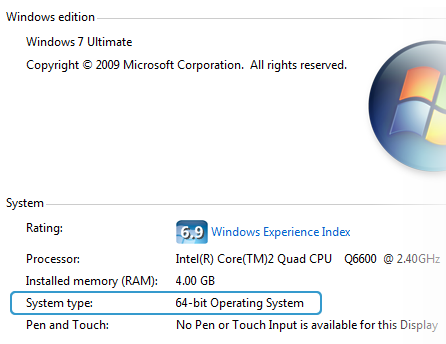
Most of the Windows 7 product editions ship in both 32-bit and 64-bit flavors in the retail package. Users purchasing new PCs will be given a choice of either 32 or 64 bit operating systems at their time of purchase. There are no cosmetic or functionality differences between 32 and 64 bit, but there is one small under-the-hood different. The 64-bit versions of Windows 7 support either 16GB or 192GB of RAM, while the 32-bit editions only support a maximum of 4GB. All new and relatively new CPU's are 64-bit compatible and users should almost always choose 64-bit versions of Windows 7.

Read more...

Tuesday, August 4, 2009

Microsoft announces XP Mode RC for Windows 7

T
hree months after first introducing Windows 7’s virtual XP Mode, Microsoft has announced the availability of its release candidate (RC) version. As previously reported, this is an optional add-on for Windows 7 Professional or higher, and is aimed at helping small to medium-size businesses upgrade to Windows 7 by giving them a virtual Windows XP environment capable of running any legacy applications they may rely on.


This is only intended as a “last mile” of compatibility for business users, according to Microsoft, which has clarified that most XP applications will run natively on Windows 7. The software requires an additional 1GB of RAM, 15GB of available disk space, and a processor capable of hardware virtualization with AMD-V or Intel VT.

Refinements in the Windows XP Mode release candidate include new USB and drive sharing support options along with a user tutorial aimed at the small and midsize business market. It also now allows users to view recently opened Windows XP applications in the Windows 7 Jump Menu and open them from the task bar. The near-completed software is be available for public testing now and should be released in its final form at the time of the Windows 7 launch on October 22.

Read more...

Monday, August 3, 2009

Ubuntu prepares to move in on small businesses

The company behind the world's most popular desktop Linux distro has their sights set on expansion. Apparently satisfied with their desktop infrastructure, Canonical is now offering support services for small businesses, all centered around using Ubuntu as the platform of choice.


Starting with three different support options, the company is aiming specific configurations and implementations of Ubuntu for different businesses with different requirements – ranging from getting desktops off the ground to complete migrations of office environments.


Canonical will join a small but growing (if slowly) market of companies aimed exclusively at Linux desktop support. Is this a positive change for Linux? Probably – one of the biggest gripes that most businesses have is the lack of decent support. While many specialized companies offer fantastic support for their particular niche, there is a huge gap in the quality and availability of support elsewhere. If Canonical thinks they have the manpower to offer a paid business support program, they might also be able to convert some offices.

In the short term, nothing is likely to change for Ubuntu or Canonical. If, however, they combine this with a decent PR campaign and make sure their support is up to snuff, they could get a nice foothold in the small business market, which is almost exclusively a Windows-owned domain.

Read more...

Wednesday, July 29, 2009

Windows 7 Ultimate cracked via OEM master key

A
ccording to a report from My Digital Life, Windows 7 Ultimate has already been cracked with the aid of leaked OEM DVD ISO from Lenovo. The crack provides permanent instant offline activation and passes WGA with flying colors. The leaked ISO was posted and snagged off a Chinese forum, which allowed hackers to retrieve the OEM-SLP and certificate for Windows 7 Ultimate.


Redmond has updated the System-Locked Pre-installation (SLP) to version 2.1, which supports Windows 7 and Windows Server 2008 R2 – and provides backward-compatibility for Vista and Server 2008. The SLP procedure is used to pre-activate Windows for mass distribution by OEMs. Its latest version requires the BIOS SLIC table be updated, as it contains a new Windows marker. The trick is to mod a system's BIOS to include SLIC 2.1 – which can be done via hard (physical) or soft (emulation) mods.

The original post gets more in-depth, and contains much more information. Naturally, the crack can already be found on various torrent sites. I’m not about to preach right from wrong here, as you won’t listen anyway. That said, if you’re going to download Windows 7 from an unofficial source, at least verify your copy.

Read more...

Should You Install Windows 7 32-bit or 64-bit?

W
ith the upcoming release of Windows 7, the question is raised again on whether you should install the 32-bit version (x86) of the operating system or move up to 64-bit (x64).

This is something that's been asked since the introduction of consumer-level processors bearing the “x64” nomenclature. It feels like just yesterday that Intel and AMD fanboys were at odds over the Athlon 64. At that time and even as recently as the introduction of Windows Vista, software and drivers for 64-bit setups were slim-pickings.

Analogous to the shift from 16 to 32-bit computing, the jump to 64-bit has been a slow one. Windows XP x64 never took off, though 64-bit versions of Vista did, thankfully. The ride was a bumpy one, but hardware manufacturers and software developers alike have finally widely adopted the 64-bit architecture - and there’s no turning back now.


At this point in time, nearly everyone is on the same page about the transition. If your old video card and printer have yet to receive 64-bit compatible drivers, odds are they won’t be getting any. A boatload of legacy hardware support was dropped with Windows Vista, and Windows 7 certainly won’t pick it back up, regardless of which version you install.


Now, you’re probably wondering why 64-bit operating systems are being phased in and what benefits they deliver over their 32-bit predecessors – both legitimate questions. One of the most commonly cited differences is that the 32-bit architecture has a memory access limit of 4GB (2^32 bytes). This permits you to use about 2.75-3.5GB of RAM after IO reservations are factored in.

On paper, the 64-bit architecture can address 16 exabytes of memory (2^64), or more than 4 billion times that of its precursor. Consumer editions of Windows Vista permit from 8GB to 128GB of physical memory to be accessed, depending on the version. Windows 7 bumps that up to 192GB with the Professional version and above.

Other benefits of running a 64-bit OS include enhanced security with hardware-backed DEP, Kernel Patch Protection and mandatory driver signing.

This is all just scratching the surface, but I suppose the real question should be:

Why shouldn’t you install Windows x64?

The short answer is that you should go with Windows 7 64-bit unless you’re running a system well into its antiquity where driver support is going to become an issue.

Microsoft has useful online tools that can scan your system and external peripherals and give you an outlook of what's currently supported and what's not. A few useful links:

- Windows Vista Compatibility Center
- Windows 7 Compatibility Center (not yet available)
- Windows 7 Upgrade Advisor

Read more...

Monday, July 27, 2009

Verify Windows's ISo File..........

W
ith Windows 7 on the brink of completion, the RTM phase is expected to come before the end of the month - possibly even less than a week from now. Already proving to be both popular and successful, you can bet your bottom dollar that the RTM copy of Windows 7 will hit torrent sites instantaneously.

Now, we’re not encouraging you to go and pirate the software, and we don’t have to. A majority of the enthusiast community will download Windows 7 illegitimately. Some will have already pre-ordered Microsoft’s latest OS, others will undoubtedly come into a legal copy at one point or another, and many will flat out steal 7 – you know who you are.

That out of the way, the bottom line is, nobody wants to wait until October 22 to get their hands on the final build of Windows 7. Unfortunately, by jumping the gun, you’re going to have to trust an unofficial source. This certainly has its risks, as we’ve seen with past reports of infected torrents of Windows 7 creating botnets.


Recognizing this fact, Long Zheng and Sven Groot developed a handy application which generates and verifies the hash of your Windows 7 ISO. The program is very small at 253KB, and beyond easy to use. To check the validity of your ISO, download the free utility here. Run the program (Windows7IsoVerifier.exe) and you can browse to your ISO file (or just drag and drop it onto the executable).


The process of downloading the program and verifying your copy of Windows 7 should take less than a minute if you have quick fingers and a modern system. At the time of writing, it only works with the English versions of Windows 7.

Read more...

Saturday, July 25, 2009

No More IE On Windows 7 ?

It would seem that Microsoft has conceded to the requests of European regulators after facing antitrust accusations. On January 15, the European Commission charged the software giant with seeking to hinder rivals by coupling Internet Explorer with its Windows operating system. With Microsoft’s OS being used on a vast majority of the world’s PCs, the company was accused of harming innovation and limiting consumer choice.


Redmond considered stripping IE from the European version of their latest operating system, Windows 7, but has since scratched that plan. Instead, the company has proposed a consumer “ballot screen” on the system’s first boot up, permitting users to choose between several third party browsers. Windows 7 will still ship with IE, but users will have the option to disable it. PC makers will also be permitted to pre-load any desired browser onto their systems.

I’m not entirely sure how Microsoft can even be pinned for abusing their market dominance by excluding competitor’s software from their own operating system. In my mind, it’s equivalent to a local diner forcing McDonalds to carry the diner’s homemade fries. Where is the line drawn?

Read more...

Friday, July 24, 2009

Google Chrome Introduce New OS 2010

After nine month release their Chrome Browser, Google claim that over 30 Million people downloded arround the world.

and now google intend to made their own operating system they call "Google Chrome operating System", it's open source ; lightweight operating system that will initially be targeted at netbooks. Later this year will open-source its code, and netbooks running Google Chrome OS will be available for consumers in the second half of 2010 and we'll soon be working with the open source community.


according to Google Official Blog, this google OS design to be fast and lightweight, to start up and get you onto the web in a few seconds. The user interface is minimal to stay out, and most of the user experience takes place on the web.

Google Chrome OS will run on both x86 as well as ARM chips and we are working with multiple OEMs to bring a number of netbooks to market next year. The software architecture is simple — Google Chrome running within a new windowing system on top of a Linux kernel. For application developers, the web is the platform. All web-based applications will automatically work and new applications can be written using your favorite web technologies. And of course, these apps will run not only on Google Chrome OS, but on any standards-based browser on Windows, Mac and Linux thereby giving developers the largest user base of any platform.

Google Chrome OS is a new project, separate from Android. Android was designed from the beginning to work across a variety of devices from phones to set-top boxes to netbooks. Google Chrome OS is being created for people who spend most of their time on the web, and is being designed to power computers ranging from small netbooks to full-size desktop systems. While there are areas where Google Chrome OS and Android overlap, we believe choice will drive innovation for the benefit of everyone, including Google.

Read more...

  © Blogger templates ProBlogger Template by Ourblogtemplates.com 2008

Back to TOP